Steelcase Gesture Review: Comfort, Ergonomics, Features & Performance
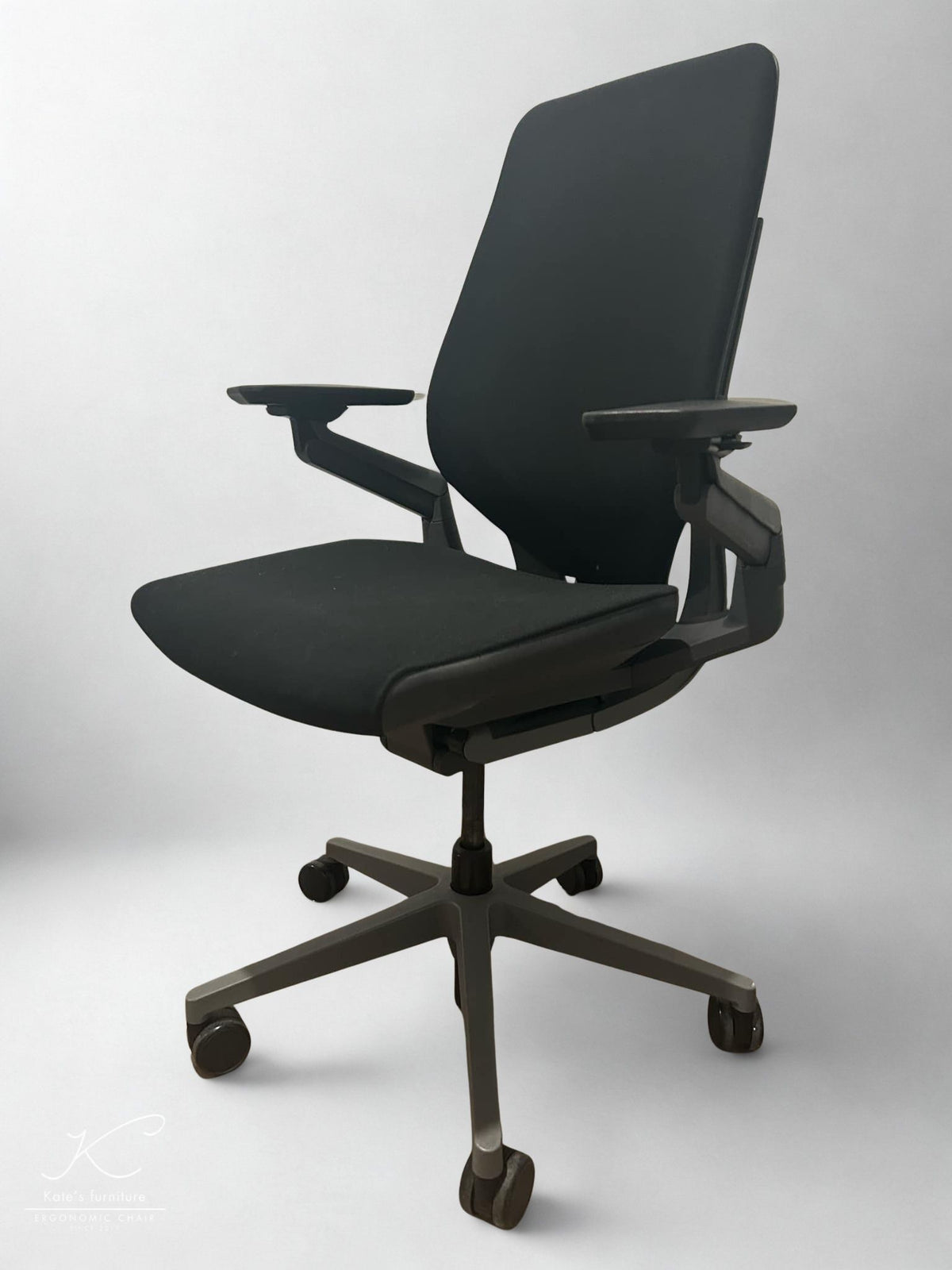
The Steelcase Gesture is a premium ergonomic office chair designed around the way people move between computers, tablets, phones and other devices. In this Steelcase Gesture review, we examine its comfort, 360 Arms, back support, adjustments, body fit and limitations to help Australian buyers decide whether a professionally refurbished model suits their workspace.
Kate Furniture specialises in professionally refurbished ergonomic office chairs. Each Gesture offered for sale is inspected, deep-cleaned and function-tested, with worn or damaged components addressed where required and available. Exact upholstery, colour, optional features and cosmetic condition can vary between individual chairs.
Steelcase Gesture review: The quick verdict
The Steelcase Gesture is most compelling for users who frequently change devices, arm positions and working postures. Its 360 Arms system provides an unusually broad adjustment range, while the contoured back, adjustable seat depth and variable recline support movement between focused keyboard work, reading and reclined calls.
Its limitations are equally important. The upholstered back will generally feel warmer than a full-mesh chair, the seat is supportive rather than deeply cushioned, and features such as an adjustable lumbar component or integrated headrest can depend on the individual configuration.
A professionally refurbished Gesture can provide strong long-term value when the chair fits your body, its mechanisms have been properly inspected and the exact configuration is clearly documented.
View current refurbished Steelcase Gesture availability
Who is the refurbished Steelcase Gesture for?
The Gesture is designed for users whose posture and device position change throughout the working day. Its adjustment range can be particularly useful for home-office professionals, developers, designers, content creators and hybrid workers who alternate between typing, mousing, reading, calls and mobile devices.
Choose the Steelcase Gesture if you:
- Move regularly between a keyboard, mouse, phone or tablet.
- Want armrests that can move closer to your torso.
- Alternate between upright work and supported reclining.
- Prefer a tall, contoured upholstered back.
- Want adjustable seat height, seat depth and recline resistance.
- Prefer professionally refurbished commercial furniture.
- Can confirm the configuration and condition before ordering.
Consider another chair if you:
- Prioritise maximum airflow in a warm room.
- Want a soft, deeply cushioned seat.
- Need particularly strong or independently adjustable lumbar pressure.
- Prefer a chair with only a few simple controls.
- Require a headrest but the available Gesture configuration does not include one.
Steelcase Gesture specifications at a glance
The following figures are based on Steelcase’s current Asia-Pacific Gesture documentation. Dimensions and included features can vary between production years and configurations, so confirm any critical requirement against the individual refurbished chair.
| Specification | Steelcase Gesture |
|---|---|
| Overall depth | Approximately 534–601 mm |
| Overall width, including arm range | Approximately 569–880 mm |
| Overall height without headrest | Approximately 997–1,124 mm |
| Seat width | Approximately 508 mm |
| Adjustable seat depth | Approximately 401–470 mm |
| Seat height | Approximately 407–534 mm |
| Arm height above seat | Approximately 185–293 mm |
| Distance between armrests | Approximately 261–572 mm |
| Arm-cap pivot | 15° inward and 15° outward |
| Recline | Adjustable tension, upright lock and selectable recline limits |
| Manufacturer-listed capacity | Up to approximately 181 kg |
| Adjustable lumbar component | Configuration-dependent |
| Integrated headrest | Optional; confirm against the exact listing |
Published dimensions describe the model rather than guaranteeing comfort for every person within the stated range. Seat depth, arm clearance, lower-leg length and torso proportions remain important.
How comfortable is the Steelcase Gesture?
Seat comfort: supportive rather than soft
The Gesture uses a broad upholstered seat with flexible edges designed to accommodate movement around the thighs. The overall feel is better described as stable and supportive than deeply padded.
This may suit users who want a consistent surface for desk work. Buyers moving from a heavily cushioned executive chair may initially find the seat firmer than expected. Comfort remains personal, and the condition of the foam is particularly important on a refurbished chair.
Before purchasing, check that the seat feels even from side to side and that the foam has not developed obvious compression. The seat-depth slider should also move smoothly and lock securely in the selected position.
3D LiveBack and Core Equalizer support
The Gesture uses 3D LiveBack to allow the backrest to flex and contour as the user changes posture. This is intended to maintain broader contact with the back during small movements, upright work and reclining rather than holding the user against a rigid shell.
The Core Equalizer connects the response of the seat and back and helps maintain lower-back support through different recline positions. Some configurations also include an additional height-adjustable lumbar component, but this should not be assumed unless it is shown or described on the product page.
Users who prefer broad, responsive support may enjoy the Gesture. Those seeking more direct control over lumbar position and lower-back firmness should also consider the Steelcase Leap V2.
The 360 Arms are the standout feature
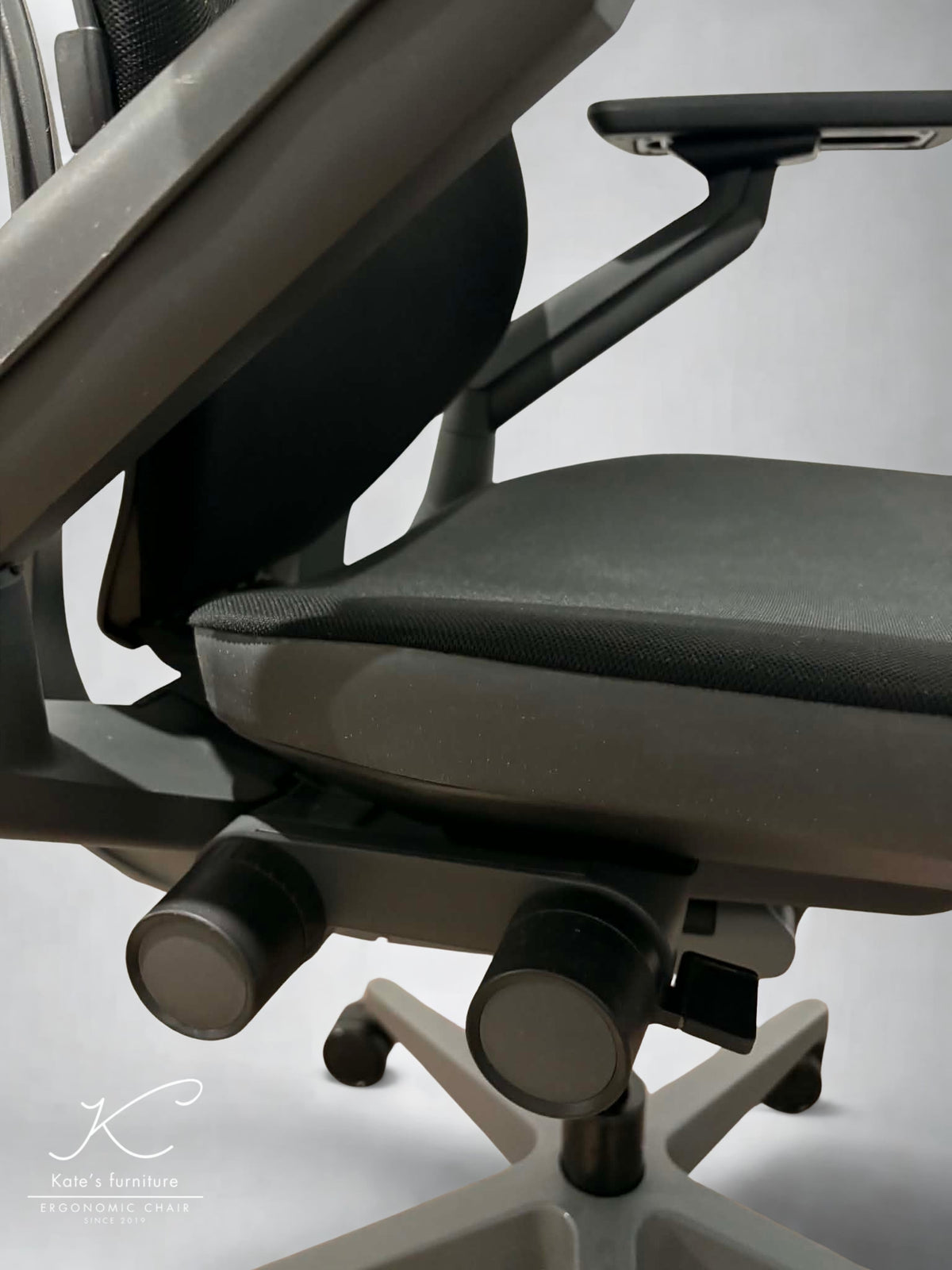
The Gesture’s arm system is the clearest reason to choose it over many other premium task chairs. The arms can be repositioned in height, width and depth, while the arm caps pivot inward and outward.
The term “360 Arms” describes the broad movement of the complete system. It does not mean that each arm pad spins through a full 360 degrees.
This adjustment range can be useful when moving between a centred keyboard, a mouse positioned further to one side, a phone, a tablet or a graphics device. Bringing the armrests closer to the torso may also reduce unsupported reaching during compact keyboard and mobile-device use.
Some users may not need the full range. If your keyboard, mouse and arm position remain fixed throughout the day, a simpler arm system may provide everything you require.
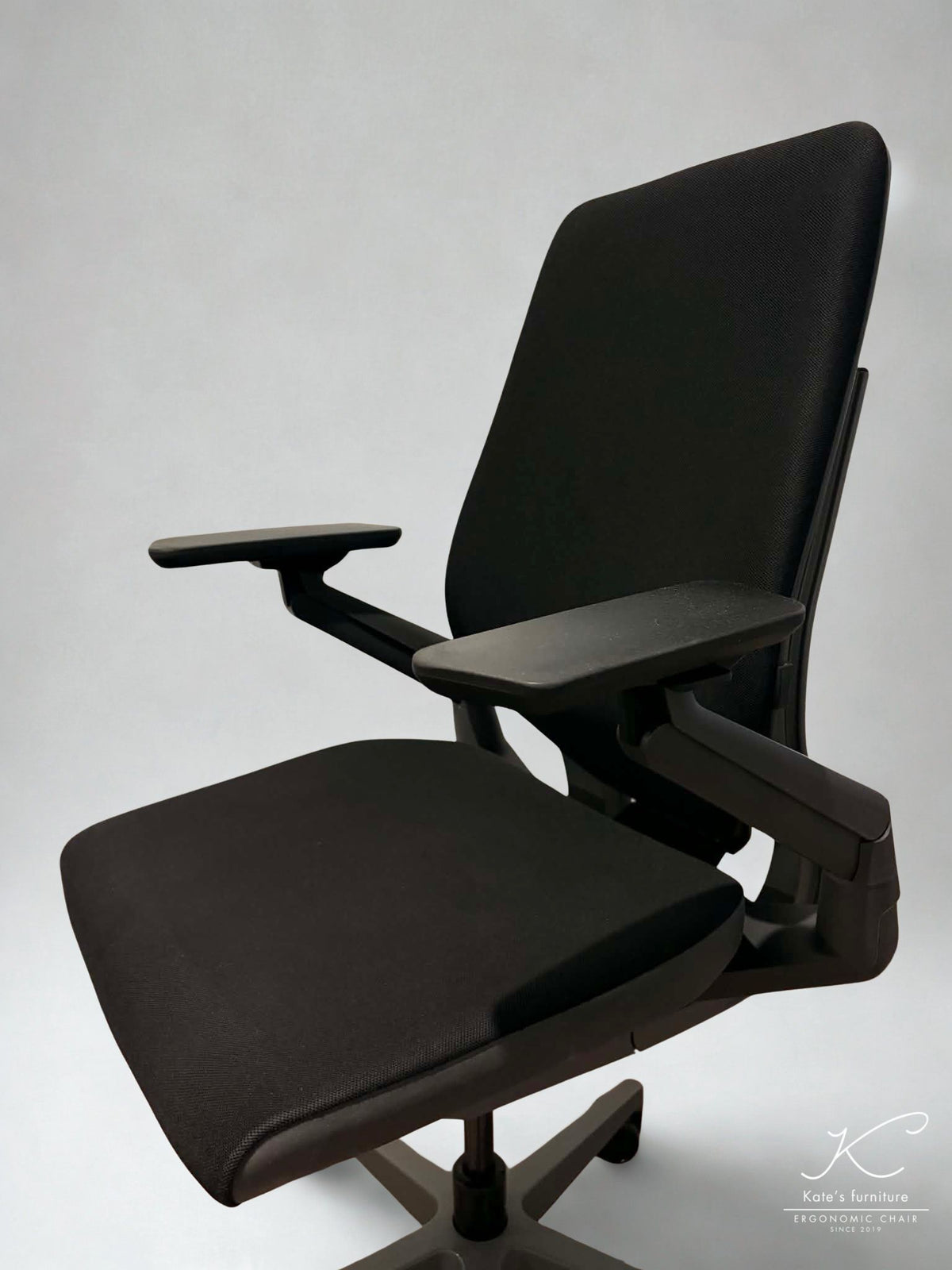
During refurbishment, arm movement and stability should be inspected carefully. Both sides should hold their selected height and move consistently without excessive looseness. If the mechanisms remain healthy but the pads are worn, check the availability of Steelcase Gesture replacement arm pads.
Recline and movement during the workday
The Gesture includes adjustable recline resistance, an upright lock and selectable recline limits. These controls allow the user to choose a more upright position for focused keyboard work or permit greater movement during reading, calls and less task-intensive activities.
The recline should feel controlled rather than abrupt. On a refurbished Gesture, the back-tension control, upright lock and available stop positions should all be tested rather than checking only whether the chair can lean backwards.
An ergonomic chair should support movement, not encourage one fixed posture throughout the entire working day. Regular changes of position and short breaks remain important even when the chair has been adjusted correctly.
Heat and breathability in Australian conditions
The Gesture’s upholstered seat and back will generally retain more heat than a full-mesh chair. In an air-conditioned office this may not be significant, but the difference can become more noticeable in a warm home workspace without active cooling.
Fabric type, clothing, humidity, direct sunlight and individual heat sensitivity all influence the result. Buyers who prioritise maximum airflow should compare the Gesture with a mesh-backed alternative before deciding.
Does the Steelcase Gesture fit different body types?
Shorter users
The minimum seat depth of approximately 401 mm and seat height of approximately 407 mm may accommodate many shorter users. The correct fit still depends on thigh and lower-leg length.
When seated, both feet should be supported and there should be a small gap between the front edge of the seat and the back of the knees. A footrest may be needed if the seat remains too high at its lowest setting.
Taller users and longer torsos
The maximum seat height of approximately 534 mm, adjustable depth of up to 470 mm and relatively tall back may suit many taller users. However, two people of the same height can have different torso and leg proportions, so published dimensions should not replace an individual fit check.
The integrated Gesture headrest is configuration-dependent. If upper-neck or head support is important, confirm that the exact refurbished chair includes the factory headrest rather than assuming it can be fitted later.
Larger users
Steelcase publishes a model capacity of up to approximately 181 kg. The seat is about 508 mm wide, while the broad arm adjustment range can create additional clearance.
Capacity does not automatically establish comfort. Larger users should still check usable seat width, arm clearance, thigh support and whether the seat edge feels comfortable.
Shared workstations
The Gesture can accommodate different working positions, but the number of adjustments means it will need to be reset when another person uses it. Shared workplaces should show users how to adjust the seat depth, arms and recline instead of leaving every chair in one default position.
How to adjust the Steelcase Gesture
- Set the seat height: Support both feet and keep the thighs in a comfortable position.
- Adjust the seat depth: Leave a small gap between the seat edge and the back of the knees.
- Set the recline tension: Choose enough resistance for controlled movement without forcing your body forward.
- Select a recline limit: Use a more upright setting for focused work or allow additional movement for reading and calls.
- Position the arms: Support the forearms without raising the shoulders.
- Adjust the lumbar component: If included, position it where support feels broad rather than concentrated or intrusive.
For a more detailed workstation setup process, read our guide on how to adjust an ergonomic office chair.
What does Kate Furniture check during refurbishment?
Kate Furniture’s refurbishment process focuses on cleanliness, core functionality and the condition of the individual chair. Each Gesture is inspected, deep-cleaned and function-tested before it is approved for sale.
Important inspection areas include:
- The chair frame and supporting structure.
- Seat-height adjustment and gas-lift performance.
- Seat-depth movement and locking.
- Recline tension, upright lock and recline limits.
- Armrest height, width, depth and pivot functions.
- Castors, five-star base and moving components.
- Backrest operation and lumbar configuration.
- Seat foam, upholstery and frequently touched surfaces.
Worn or damaged components may be serviced or replaced where required and available. Because each refurbished chair has a different service history and starting condition, the precise work performed can vary between units.
What condition should you expect?
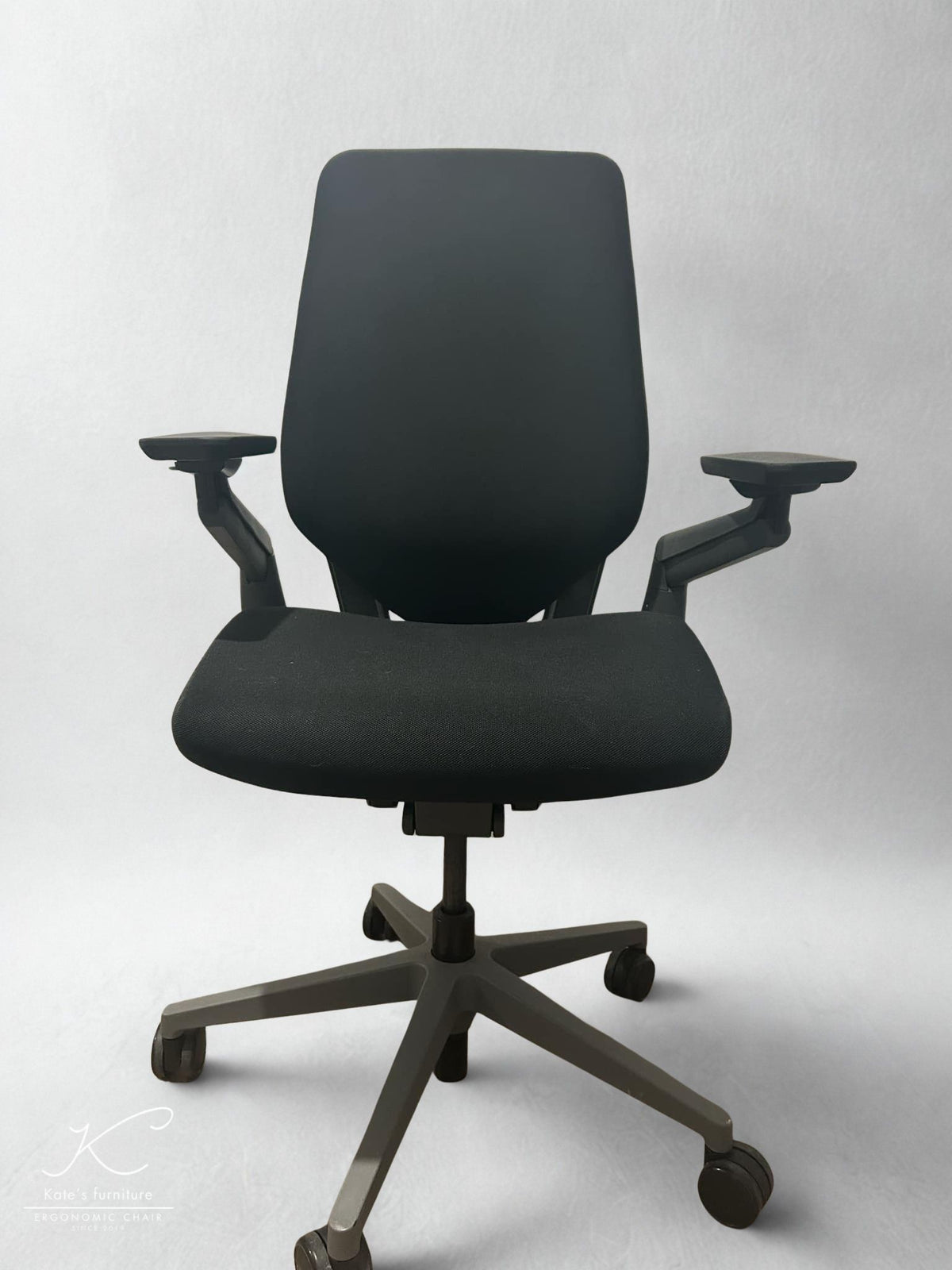
Refurbishment does not mean that a chair becomes cosmetically identical to a newly manufactured product. Minor marks, fabric variations or signs from its previous working life may remain after cleaning and preparation.
These can include light marks on the frame or base, small scuffs on plastic surfaces and minor differences in upholstery colour or texture. Such variations do not necessarily affect the chair’s adjustments or everyday function.
Customers who need confirmation of a particular chair’s appearance should review the current product photographs and ask whether additional images or a condition video are available. Colour, upholstery, casters, lumbar components and optional features should be confirmed before ordering.
Do not assume that Steelcase’s original manufacturer warranty transfers to a refurbished chair. Check Kate Furniture’s current policy and the terms attached to the exact listing.
Refurbished Steelcase Gesture pros and cons
Pros
- Exceptionally broad armrest adjustment.
- Useful for keyboards, mice, tablets, phones and creative devices.
- Adjustable seat height and seat depth.
- Responsive upholstered back designed for changing postures.
- Variable recline resistance and selectable limits.
- Broad seat and arm-clearance range.
- Commercial chair designed for continued maintenance and refurbishment.
- Inspected, deep-cleaned and function-tested by Kate Furniture.
Cons
- Warmer than a full-mesh chair.
- The seat may feel too firm for users who prefer soft cushioning.
- The large number of arm positions can be unnecessary for simple desk setups.
- Adjustable lumbar and headrest features depend on configuration.
- Minor cosmetic marks can remain after refurbishment.
- Exact colours and configurations depend on current stock.
Steelcase Gesture versus other ergonomic chairs
| Chair | Better suited to | Main advantage | Main trade-off |
|---|---|---|---|
| Steelcase Gesture | Multi-device users and people who frequently reposition their arms | Exceptionally broad arm movement | Warmer than mesh and less granular lumbar adjustment than Leap V2 |
| Steelcase Leap V2 | Users who prioritise lumbar position and lower-back firmness | More direct lumbar fine-tuning | Arm movement is less extensive |
| Herman Miller Aeron | Warm rooms and users who prefer structured mesh | Greater airflow | The framed mesh seat is less accommodating of varied sitting positions |
| Haworth Fern | Users wanting a tall, flexible back response | Relaxed and fluid back movement | Comfort depends strongly on configuration and individual fit |
If lower-back adjustment is your main priority, read our complete Steelcase Leap V2 review. Buyers specifically comparing head-support options can also read our Atlas Headrest for Steelcase Leap V2 review.
Is a refurbished Steelcase Gesture worth it in Australia?
A refurbished Steelcase Gesture can be worthwhile when its arm range, seat dimensions and back support match the way you work. Its value is strongest for users who will regularly use the 360 Arms and move between several devices or working positions.
It represents weaker value when purchased for brand reputation alone, when a simpler chair would meet the same needs or when an optional headrest or lumbar feature is assumed but absent.
Refurbishment quality and configuration matter more than a generic model reputation. Before purchasing, review the product photographs, condition information, included features and Kate Furniture’s current delivery, pickup and inspection options.
Final verdict
The Steelcase Gesture remains a distinctive premium task chair because of how effectively its arms can adapt to changing devices and positions. Its seat-depth adjustment, flexible back and controlled recline make it particularly relevant to professionals who move throughout the working day rather than remaining in one fixed posture.
It will not suit every buyer. People who prioritise maximum airflow, very soft cushioning or especially pronounced lumbar pressure should compare alternatives. For the right user, however, a professionally refurbished Gesture can provide a capable, adjustable and maintainable chair for a long-term workspace.
Explore refurbished Steelcase chairs
Check the current condition and configuration of the refurbished Steelcase Gesture, or browse Kate Furniture’s complete range of refurbished Steelcase chairs.
You can also compare models across the wider refurbished ergonomic office chair collection or browse compatible chair parts and accessories.
Frequently asked questions
Is the Steelcase Gesture comfortable for long working days?
It can be comfortable for extended desk work when the seat depth, arms and recline are adjusted correctly. Its seat feels supportive rather than deeply padded, so comfort will depend on personal preference and the condition of the refurbished seat foam.
Is the Steelcase Gesture suitable for tall users?
Its maximum seat height, adjustable seat depth and relatively tall back may suit many taller users. Torso and leg proportions still matter, so individual fit should be checked rather than relying on height alone.
Does every Steelcase Gesture include adjustable lumbar support?
No. The Gesture has built-in back and lower-back support, but the additional height-adjustable lumbar component depends on the chair’s configuration.
Does every refurbished Gesture include a headrest?
No. The integrated headrest is optional and should only be considered included when it is clearly shown or stated on the product page.
Is the Steelcase Gesture better than the Leap V2?
The Gesture is generally more compelling for arm positioning and multi-device work. The Leap V2 may be preferable for buyers who want more direct control over lumbar position and lower-back firmness.
Will a refurbished Gesture have cosmetic marks?
Minor marks or upholstery variations may remain. Refurbishment focuses on cleaning, functional inspection and servicing where required rather than making the chair cosmetically identical to a newly manufactured product.
What does Kate Furniture check during refurbishment?
Inspection focuses on the frame, gas lift, seat-height and depth controls, recline, arm movement, backrest, castors, base, upholstery and general functionality. The exact work performed can vary between individual chairs.
Does a refurbished Steelcase Gesture include the original Steelcase warranty?
The manufacturer’s original warranty should not be assumed to transfer. Review Kate Furniture’s current policy and confirm the terms attached to the exact product listing before ordering.

